



How Trapping and Chokes Work for Flexo Presses
In flexographic printing, precise registration is critical to producing clean, consistent labels and packaging. Even small variations between printing plates can create visible gaps, halos, or unwanted color shifts where two colors meet.
Two important prepress techniques help manage these challenges: trapping and chokes.
While they are related, trapping and chokes solve different problems. Understanding how each works can help printers, designers, and packaging teams better understand how artwork is prepared for the press and why certain adjustments are made before a job reaches production.
For a broader look at how flexographic printing continues to evolve, see our overview of flexographic printing technology and trends.
Key Takeaways
- Trapping creates a small overlap between adjacent colors to help prevent gaps caused by registration variation.
- A choke slightly reduces the size of an element, allowing another color or element to overlap it cleanly.
- Trapping is particularly important when two or more colors meet and perfect registration cannot be guaranteed.
- Chokes can help control the appearance of borders, text, knockouts, and other elements.
- Both techniques are typically handled during the prepress stage before plates are produced.
- Proper trapping and choking can help improve print consistency and reduce visible registration issues on press.
What Is Trapping in Flexographic Printing?
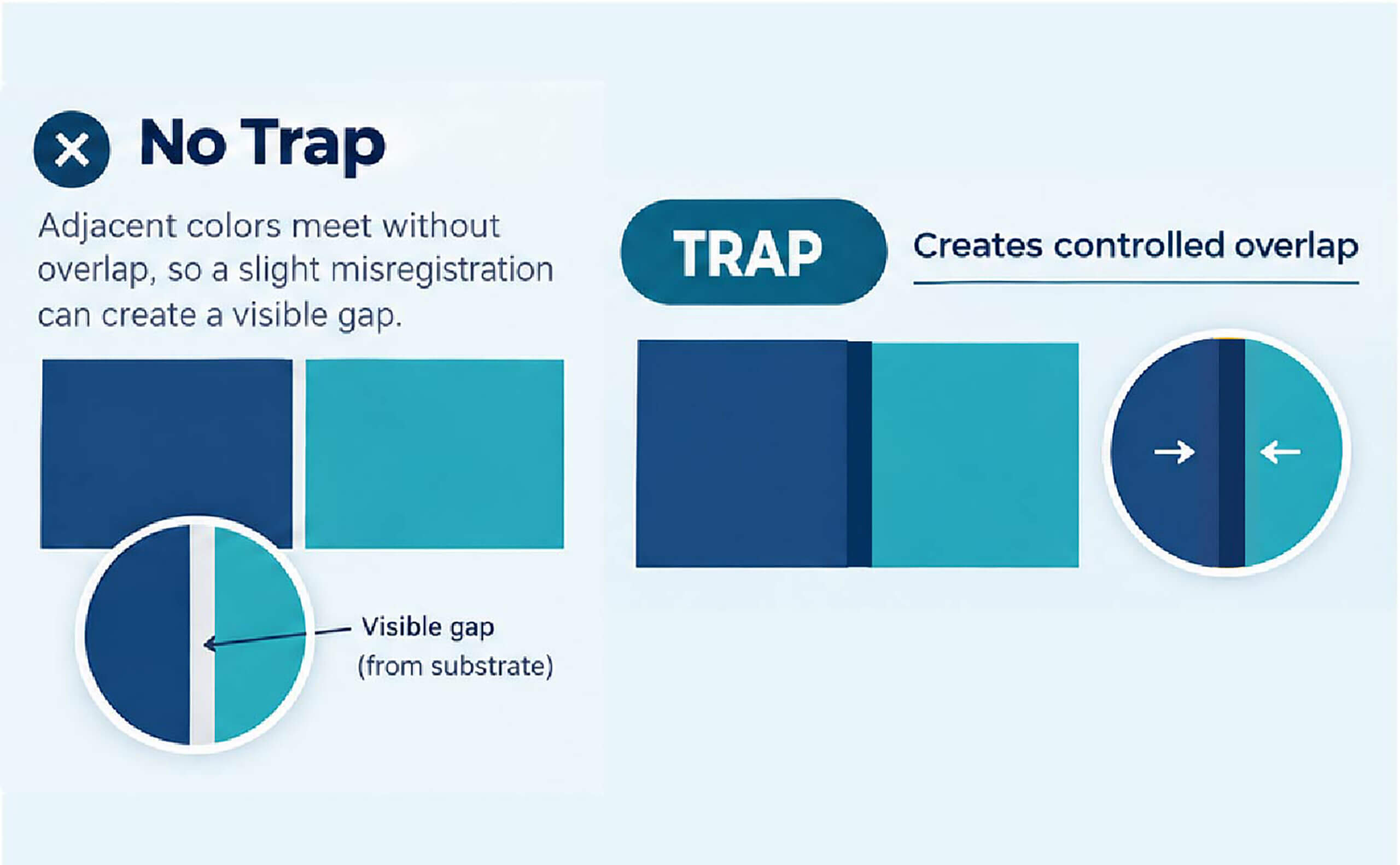
Trapping is a prepress technique that creates a small overlap between adjacent colors or printing elements.
In an ideal printing process, every color would land in exactly the correct position. In reality, slight movement can occur as material travels through the press. Factors such as registration tolerances, substrate movement, press conditions, plate mounting, and mechanical variation can all contribute to small shifts.
Without a trap, that shift can expose the substrate between two colors.
For example, imagine a blue background with a yellow graphic positioned directly against it. If the yellow plate shifts slightly during printing, a thin line of the underlying material could become visible between the two colors.
A trap allows the colors to overlap slightly instead.
How Does a Trap Work?
A trap essentially expands one color slightly into an adjacent color.
Without trapping:
Blue | Yellow
If the yellow shifts slightly away from the blue, a gap may appear.
With trapping:
Blue | Yellow overlapping slightly
The overlap provides a margin of error. Instead of exposing the substrate, the colors continue to meet even if there is a small amount of registration variation.
The amount of trapping used depends on the specific application, printing process, substrate, colors, artwork, and press capabilities.
The Flexographic Technical Association also identifies trapping as an important part of a flexographic prepress workflow, with settings that can be tailored to individual press specifications.
What Is a Choke?
A choke is essentially the opposite type of adjustment.
Instead of expanding an element into another color, a choke slightly reduces the size of an element or knockout area.
This can be useful when one element needs to sit cleanly inside or against another element.
For example, if a small white area is intended to sit inside a larger colored element, a choke can reduce the white area slightly so that the surrounding color overlaps it.
This helps prevent unwanted white edges or halos if registration shifts during printing.
Choke vs. Trap
The easiest way to think about the difference is:
Trap = make an element slightly larger so it overlaps another element.
Choke = make an element slightly smaller so another color or element can overlap it.
Both are ways of building tolerance into the artwork before it reaches the press.
Why Are Trapping and Chokes Important for Flexo?
Flexographic presses print multiple colors, often using separate plates and printing stations. Each plate must register correctly with the others as the web moves through the press.
Perfect registration is the goal, but there is always some degree of tolerance.
Trapping and chokes help account for that tolerance.
Without these adjustments, even a relatively small registration variation can result in:
- Visible gaps between colors
- White or substrate-colored halos
- Misaligned borders
- Uneven edges
- Changes in the appearance of small text or graphics
- Reduced overall print quality
By incorporating appropriate traps and chokes during prepress, artwork can be prepared to perform more reliably under real-world press conditions.
For more information about preparing artwork and plates for flexographic production, see Inovar’s flexographic label printing capabilities.
How Trapping Works Between Colors
Not every color combination requires the same trapping approach.
The visual impact of a registration shift can depend heavily on the colors involved.
For example, a small shift between two similar colors may be difficult to notice. A shift between a dark color and a light or white area can be much more obvious.
The direction of the trap can also matter.
In many cases, the lighter color is expanded toward the darker color because a small overlap is less noticeable than the reverse. However, the appropriate approach depends on the specific artwork and printing requirements.
Prepress teams consider factors such as:
- Ink color and density
- Substrate color
- Dot gain
- Artwork dimensions
- Registration tolerances
- Line screen
- Printing sequence
- Type of graphic or text
- Whether the area is solid or screened
The goal is not simply to add as much trap as possible. The goal is to create enough overlap to protect against registration variation without creating a visible change in the artwork.
For a deeper look at how modern flexo prepress workflows handle trapping, color management, and other process-specific decisions, Esko’s guide to flexo prepress provides additional technical context.
Trapping Small Text and Fine Graphics
Small type and fine graphic elements require additional consideration.
A trap that is appropriate for a large graphic may be too noticeable on small text.
For example, expanding a small letter by even a fraction of a millimeter can affect its appearance. This is why trapping decisions need to consider the size and complexity of the element being adjusted.
In some cases, a choke may be used instead to maintain the visual appearance of a small element.
This is also one reason why professional prepress services are an important part of the flexographic workflow. Prepress teams can evaluate artwork in the context of the specific printing process, press, substrate, and production requirements.
Trapping and White Ink
White ink creates another important trapping consideration, particularly when printing labels on clear or transparent substrates.
White may be used as a background or opacity layer underneath other colors. If the white plate does not align correctly with the other printing plates, unwanted edges or areas of transparency can become visible.
Trapping or choking the appropriate elements can help maintain clean edges and consistent coverage.
The correct approach depends on the construction of the label and the intended visual effect.
What Happens When Trapping Is Incorrect?
Too little trapping can leave visible gaps when registration shifts.
But more trapping is not always better.
Excessive trapping can create other problems, including:
- Visible color changes
- Thick or distorted edges
- Changes to small type
- Loss of detail
- Unwanted outlines
- Knockout areas that appear too small
- Changes in the appearance of fine graphics
This is why trapping needs to be balanced with the capabilities of the press and the requirements of the artwork.
Trapping Is a Prepress Decision
Trapping and choking are generally addressed during the prepress stage rather than on the press itself.
The prepress process may include:
- Reviewing the supplied artwork
- Separating artwork into individual printing colors
- Identifying areas where colors meet
- Evaluating registration-sensitive elements
- Applying appropriate traps or chokes
- Reviewing the adjusted artwork
- Creating the printing plates
- Preparing the job for production
The exact workflow varies depending on the equipment, software, printing process, and job requirements.
The important point is that trapping is part of preparing artwork to account for the realities of the printing process.
How Trapping and Chokes Support Consistent Print Quality
Flexographic printing is designed for repeatability, but every production process has tolerances.
Trapping and chokes provide a type of built-in tolerance within the artwork.
Instead of expecting every plate to align perfectly under every condition, the artwork is prepared so that small variations are less likely to become visible defects.
That makes these techniques particularly valuable for packaging and labels where clean edges, sharp graphics, and consistent branding are important.
Modern flexographic workflows continue to improve registration, plate imaging, color management, and automation. But even as press technology becomes more precise, proper file preparation remains an important part of achieving consistent results.
Frequently Asked Questions
What is trapping in flexographic printing?
Trapping is a prepress technique that slightly overlaps adjacent colors to reduce the risk of visible gaps caused by registration variation during printing.
What is a choke in flexographic printing?
A choke slightly reduces the size of an element or knockout so that another color can overlap it. This helps prevent unwanted halos or exposed substrate caused by registration shifts.
What is the difference between a trap and a choke?
A trap generally expands an element to create an overlap, while a choke reduces an element so another color or element can overlap it.
Why is trapping important in flexographic printing?
Trapping helps compensate for small registration variations between printing plates, reducing visible gaps, halos, and other registration-related defects.
Is trapping done on the flexo press?
Trapping is typically handled during prepress as artwork is prepared for plate production. The exact workflow depends on the printer, equipment, and prepress process.
Can too much trapping cause problems?
Yes. Excessive trapping can alter the appearance of colors, edges, small text, and fine graphics. The amount and direction of trapping should be appropriate for the artwork and printing process.
Does every flexo job require the same amount of trapping?
No. Trapping requirements can vary based on the press, substrate, inks, artwork, registration tolerances, and the specific elements being printed. Press-specific prepress settings are often used to determine the appropriate approach.
The Bottom Line
Trapping and chokes are small prepress adjustments that can make a significant difference in flexographic printing.
Trapping creates controlled overlap between elements, while chokes reduce an element to allow another color to overlap it. Both techniques help account for the small registration variations that can occur during production.
When applied correctly, they help protect artwork from visible gaps, halos, and other registration issues while supporting more consistent print quality. For flexographic labels and packaging, understanding what happens during prepress can provide valuable insight into how artwork is prepared to perform on press. Learn more about Inovar’s flexographic label printing capabilities or explore our prepress services to see how artwork moves from file to finished print.
THE LATEST FROM INOVAR




WE'RE HERE TO SERVE YOU
Creating and producing labels can be overwhelming, but our experts are here to guide you every step of the way. Whether you have a project ready to go, have questions about label applications or materials, or want to learn more about our services, our team is ready to assist you.